Adsense

Tuesday, January 10, 2012

PSP Tutorial - Fix Semi Bricked PSP 3000

*** Friendly Notes : Proceed at your own RISK.***
Semi-Bricked PSP 3000 condition :
PSP couldn't boot into the XMB (black screen and green light, then no green light and no XMB) but it can boot into recovery mode.

Requirement : 
1) Download these file :
2) Brain

Procedure :
1) Boot your PSP into RECOVERY Mode.
2) Select Option "TOGGLE USB Mode"
    ***It should bring you your MEMORY Stick.***
3) If your Memory Stick Doesn't showed up, go into "CONFIG" and check to make sure the "XMB USB
    Device" is set to "Memory Stick" (use left and right to adjust)
4) Place both of the files you downloaded in your ms0:/PSP/GAME/.
5) From your PC, run "Semi-BrickRecovery.exe" in the folder.
    ***This will create two folders (or merge if they exist) called "RECOVERY" and "UPDATE". Inside
          UPDATE there should be a file called OFW.PBP and inside RECOVERY there should be an
          EBOOT.PBP and a trick.prx file. This will upgrade the PSP to 6.35***


Move the EBOOT.PBP from the archive into the update folder, renaming it OFW.PBP so it replaces the current one.

6) Delete your SEPLUGINS folder from the root of your memory stick. Why? Because your plugins might
    cause problems.
7) Turn Off USB. Choose the "Reset Device" option, press X and hold R to go back into recovery
    mode again.
8) Pick the option that reads "Run /PSP/GAME/RECOVERY/EBOOT.PBP"
9) An application should open, telling you to either press X or R if you want to install OFW or not.Suggested
    Action : Just press X.

After you've done all 9th STEPS above your PSP will go black, then spend a little bit of time loading the updater. Then it'll run it. Update like normal, and you'll have 6.35 OFW (or whichever version you chose).

Note : Dear readers, this guide was taken from https://forums.dashhacks.com. I hope it helps you! :)
Credits :
hmohammed43

Sunday, January 8, 2012

PSP Tools - UMD to ISO Converter

Dear PSP Fans,

Try this homebrew software for your PSP as it allow you to convert your UMD Games into ISO format. Not only that, it can compress the ISO into CSO.


After you download this file, extract it to your computer and copy all the files into your PSP Root directory. Where's ROOT DIRECTORY? It's the First page if you open your Memory Stick from My Computer. For example X:, Where X is your Memory Stick Drives Letter.

Note : Your PSP must run under CFW (Custom FirmWare) to be able to run this software. 

Good Luck!!!

ISO to Eboot Converter or Eboot to ISO Converter

Hello dear readers,

Today I'm going to share a TOOLS which allows you to convert PSX ISO file into PSP Eboot.pbp. Simply means that you can play PS1 / PSX Games in your PSP 1000, PSP 2000 or PSP 3000. This software not only allow you to convert ISO to Eboot but also the reverse that is to convert the file format from Eboot to ISO. Great right? With this software, you can save your time. :)

This software is called Impaler's PSX eBoot Creator. FRIENDLY REMINDER : This converter only works for ISO and will not work for other format of images such as BIN or IMG. So, if your PSX is in BIN or IMG format, you need to convert it into ISO first. Need a BIN/IMG/NRG to ISO Converter?


All right, after you obtain your PSX.ISO, you can start working now. The only tools you need is the Impaler's PSX Eboot Creator.


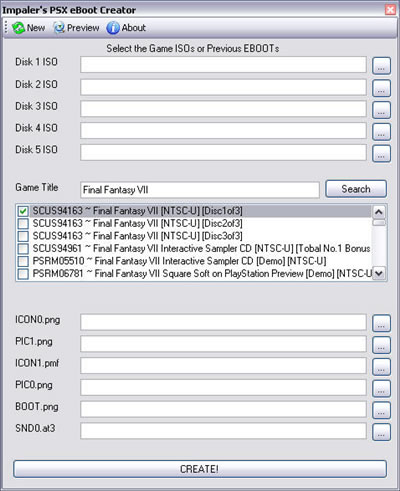
After you downloaded the file, please extract and install if necessary. Below is the guide on how to use this software. 

You should see this windows if you run the Impaler's Eboot Maker
Step 1 
When you first run the Impaler's Eboot Maker, you will arrive at selection screen like above picture which allow you to choose to select ISO or Eboot. Choose Eboot if you want to convert Eboot to ISO and Choose ISO if you want to convert ISO to Eboot.

Step 2
After choosing your ISO (Multi Disc), you need to insert the Game Title eg. Final Fantasy and Click on the "Search" button. It will list down all Games with Final Fantasy Title. Now, what to choose? NTSC or PAL??? Don't know? Don't PANIC. Firstly, mount your ISO  into a Virtual drive. Don't have a virtual drive? Click HERE to download DAEMON Tools. After mount your ISO, open My Computer, and check the ISO you mounted. Is it SLUS or SLES? If it SLUS > NTSC, If it SLES > PAL. Problem Solved.:)

Step 3
After choosing the right format for your PSX.ISO, you need to select the picture or display of the Eboot. This is optional. If you leave it blank, it will show default picture. Customize it to make your eboot looks classy inside your PSP. :)

Saturday, January 7, 2012

Ninja Saga Hacks - UNBANNED NINJA SAGA CHARACTER

Hello guys,
Today I want to show you how you can restore your Ninja Saga Character which already BANNED by NS Team. :) I know you have put such great effort to raise your character from scratch to the present and suddenly got BANNED because you dabble with HACKS that you shouldn't even touch.

Now, we can take a deep BREATH as we will not needing the DELETE button again. We can RESTORE the status of our BANNED Character. Please follow the procedure below to UNBANNED your character. Please be patience.

Requirement : 
1) Charles Proxy - Download Page
2) Java
3) Your Patience and Focus

Steps to FOLLOW :
1) Make sure you already INSTALLED JAVA & CHARLES PROXY (Can download from the link
    above)
2) Open Charles
3) Go to Your Facebook and Open Ninja Saga (Don't Click Your Character and Don't click Play)
4) Go back to Charles Proxy. (Find "app.ninjasaga.com" - Left Column)
5) Right click the app.ninjasaga.com. -> Breakpoint
6) Click your Character and Click PLAY!
7) Charles Proxy will work for you.
8) Choose AutoRespond. (Look at bottom most, you will see a string of number).
9) Change the last 2 digit into 99.
10) Click Execute
11) Finish. (You have UNBANNED your character).

Ninja Saga Hacks - All Hair Style For Your Character

Note : Latest of 30 December 2011

FREE USER

PREMIUM USER


Basic Requirement : 
3) 200 Token (Required for free player - Premium User can skip this)

What you gain from this Hacks???
1) Limited Hairstyles
2) Package Hairstyles
3) Event Hairstyles

Please Follow The Steps Below : 
1) Extract the downloaded swf files.
2) OPEN FIDDLER2.
3) Drag the extracted swf files into FIDDLER2. 
4) Under AutoResponder Tabs in FIDDLER2, tick the "Enable Automatic Responses" & "Unmatched
    Request Passthrough"
5) Open your browser (for FIREFOX user, you need to force traffic to FIDDLER2) How? 
    2.1. Go to TOOLS > MONITOR WITH FIDDLER > FORCE TRAFFIC TO FIDDLER
6) LOGIN to your NINJA SAGA account.
7) Clear your browser Cache.
8) Refresh the page and reload Ninja Saga.
9) Enter Style Shop and get your own rare hairstyle/s

Credits : 
Leon26 - For sharing this hacks
Aridena
Yahya Sahaja

Sunday, January 1, 2012

Ninja Saga Hack : 1 Hit Yukidaruma - December 2011

Requirement : 

1) FIDDLER2
2) (.swf) file which can be download by clicking on the link below.

Click HERE to download the .swf file

Steps to follow :

1) Open Ninja Saga
2) Open FIDDLER2
3) Drag the .swf file that you downloaded earlier into FIDDLER2.(Don't forget to extract it if it's in rar format.
    Click HERE to download winRAR and to see how to drag .swf file to FIDDLER2. 
4) Make sure you tick the "Enable Automatic Responses" and "Unmatched Request Passthrough" Under
    the AutoResponder Tabs. See picture below.


5) Clear your browser Cache.
6) Reload your Ninja Saga Page.
7) After you finish loading, Go to Santa Claus Quest and Find the Boss.
8) Have FUN guys!!! 

Refer VIDEO below if still unclear about the steps given above. :)
Click HERE to watch Ninja Saga Video Guide!

PSP Stuck Pixel Fixer

To All PSP owner,


Our PSP is an electronic devices, and its screen will sometimes will have a stuck pixel. Stuck pixel is fixable with this special video that you can download from the link below. This video will help you, if and only if your PSP Screen PIXEL is stuck and not dead. If it's a dead pixel, then i'm afraid there's nothing you can do about it. Lets hope it's just a stuck pixel.:)


Note : The video file need to be extracted using winrar. Click HERE to download winrar.

Extra Information :
1) Where should I put the extracted video file?
You need to put the video file into this folder:

E:\MP_ROOT\100MNV01

Where E: is the driver letter of either your PSP or your memory card reader.

2) How long should I run the video?
Some people solve their issue just after 2 tries. Some says run the video overnight. So, actually it depends on your luck.:) Don't give up!


Ninja Saga Hacks December 2011 - Santa Claus Quest

Requirement : 
1) Charles Proxy
2) Java
3) Your patience and Focus


Please refer to the Video Link below for a specific step by step guide.

Click HERE to Watch The Guide.


What you should know before you try this cheat?

1) This is permanent (Until Patched).
2) To AVOID ERROR, please don't Cheat on Boss, Daily Mission and Gift.
3) Take the reward from the 1st until the last reward. If you take the reward randomly, an ERROR will
    OCCUR.

Ninja Saga Hacks - Gold and Instant Mission [NEW-Still working on 20 November 2011]

Dear Ninja Saga Fans,

This hacks is consider new and latest. I've tested some old hacks which doesn't work anymore. I hope this one still working. I leave it to you to try this out. Hopes it works for you. A piece of advice for you, my friend is, don't cheat too much in the game ;).

Okay, I'm sure all of you know how to use FIDDLER2 right? Because this hacks require a software called FIDDLER2. Click HERE if you haven't download the software yet. and don't forget to install it.

What you should do?

1) Download this (.swf) file HERE. The file that you downloaded may need to be extract using WINRAR
    32bit / 64bit.
2) After you download,
    2.1) Open Ninja Saga
    2.2) Clear your browser Cache - Click HERE to learn how to clear your browser Cache
    2.3) Run FIDDLER2
    2.4) Drag the (.swf) files into FIDDLER2
    2.5) Make sure you tick the "Enable Automatic Responses" and "Unmatched Request Passthrough" Under
           the AutoResponder Tabs. See picture below.


    2.6) I believe now your ninja saga already load. But, nevermind that, clear your browser cache once again
           and refresh the page (reload the page - not click on the refresh button on top left of ninja saga
           windows).
    2.7) Now, after your ninja saga fully loaded, go to HEADQUARTERS and type this code
           "63978DCB04".

Thats ALL... Have fun guys...

Saturday, December 31, 2011

How to Improve your Gaming Experienced ( Make your Computer Run Faster ) ?

Dear Gamers,

      I believe all of us who are into gaming stuff, we always want a great environment for gaming right? What I meant with environment is the gameplay of the game. No LAG, NO DELAY, NO Nothing that interrupt you when you play. If for me, I choose performance over quality. Because, If my computer hardware is not good enough, how am I supposed to expect it to run greatly with great game? Logically, that can't be done right? This something that you need to realise by your self.
      First, look at your graphic Card, if it's only regular display, or lower than 128MB, you can't expect it to run CRYSIS2 smoothly. Even my computer with 512MB and 1 GB ATI Radeon Graphic Card only can use a lower setting in the video setting of CRYSIS2. My point is, don't expect your graphic card to run greatly with heavy games(Games with High Graphic). So, nothing can be done to speed up your computer when it comes to gaming. It really depends on your hardware(Your RAM and Graphic Card).
      In specially cases, where your graphic card is a good graphic card (512MB and above), If you still have a lag or not smooth when play your games, there must be something wrong with your computer. Maybe your windows is running something that unnecessary that eat up your memory. So you need to close that running process before you play the game. But, you don't know what to close right? I believe for people who doesn't know/familiar about the process in the task manager  couldn't possibly know which one to close. Because, if you close a process wrongly, it will crash your computer.
     That's why they(developers) create a software to improve your gaming experience. This software helps you to close whatever process that are not necessary and safe to close. Not, only that, some software have many function just to help to improve the gaming experienced (given that the lag is caused by software not by hardware). But, if you still want to try the software and still hope it brings happiness to you, you can try it. No Harm.
      The software that I always used is GAME BOOSTER's. This software is user friendly and helps a lot when it comes to improve my gaming experienced(I have a decent Graphic Card). So, you can try this software to helps you. Click HERE to go to the download page(Major Geeks). Know that this software is free and will always be. No trial and No Money Required.
      There's one more thing that people do to improve their gaming experienced. That is they Overclocking their graphic Card. But, this apply to only Computer or Laptop with graphic card(Not recommended for laptop unless you sure and really know what you are doing). This method however will make your graphic card burnt to the core if you do it wrongly. What you will gain if you succeed in overclocking your graphic card?  You will gain extra speed in your gaming experienced. What is Overclocking? It's a process where you make your graphic card runs faster than the default setting. But, the process of overclocking itself is not easy. It require time (several hours to test the stability of your graphic card, and of course your courage. You should know that your Graphic card might burnt if you do this wrongly.
      If you ask me, have I done the Overclocking myself? No. I don't want to take the risk as the graphic card is expensive for me as i'm still a full time student. I know you may found a guide on how to do the overclocking process. If you a beginner and a novice in terms of overclocking, I advice that  you shouldn't do it for the sake of your PC. You better go to nearest computer shop and buy your self a new graphic card. Unless you want to try. It's not as simple as the guide shows you. So, do it if you really want to do it. One more thing is, even after you successfully overclock your graphic card, you will only acquired slight difference in terms of speed. Not worthed to be done if your PC motherboard burnt. :) I let you do the thinking for your self.

Thanks for Reading!!! Please Comment!!!

Friday, December 30, 2011

NINJA SAGA HACKS THAT SAFE TO USE & Not BANNABLE

Hi guys,
Sample Picture

You might want to read THIS before you use / apply any of the HACKS you have downloaded in Ninja Saga.

       I believe many Ninja Saga fans who chose the easy way to earn gold, equipment, level and etc. , which in simple words, is HACKING the Games itself. Why? Because, to gain GOLD, EXP Point, weapon or item in the game is not as easy as it sound. Although people says that's the challenge you must take if you play a game. To gain something in Ninja Saga, it will require you your time, and a lots of your time. So, for that specific someone who already played this game for a thousand time, the feeling of irritation to the number of quest and clicks you must do to gain a level is unbearable. That's why they/we/I choose to use Hacks to make our Ninja Saga experience step on another level.

      Well, you can say that I have or may have tried all the hacks I found. Mostly, the easiest and almost work all the time is the FIDDLER2 Hacks. Thanks to many hackers out there, they give a chance to a free player to experienced something better than a FREE PLAYER should ever experience in Ninja Saga. The hacks you get from APPZXOR forum most likely still will work on Ninja Saga. But of course there are some that won't work anymore. Why? Ninja Saga Developers team always patched the hole that they found in their games (Holes created by hackers) .:)

The Hacks that won't work anymore is :
1) The GOLD HACK
2) TOKEN HACK (Never Worked and Not Savable)
3) Pet Hack  (Some works some don't)

Hacks that will get you banned :
1) ATM EXP Bank HACK (Always get banned if you make one silly mistake in its steps to fool Ninja Saga)
    Note : You can still level up to level 60 in 1 days. Click HERE to know how.
2) Token Hack ( If you manage to find hacks that works )
    Note : Don't trust the easy token Hacks. Most of them super fakes. So save your time and don't try to google it. Find other hacks.

Hacks that are safe to use (Which I have tested my self) :
1) Instant Mission
2) PET Hacks
3) Damage Hacks ( 1 Hit Kill Weapon )
4) Gold Hacks ( If still available )
5) TP Hacks ( More or less the same as Instant Mission )
6) Hacks other than Token, ATM EXP Bank Hacks should be fine.

*** If you want to use these hacks or wish to test it by yourself, Click HERE to go to the page ***

Skyhigh Quest (Shattered Stars) - Celestial Destroyer AKA Zhu Xian 2

Shattered Stars Quest (CD)

Hi guys,

today  I want to share with all of you a quest in Celestial Destroyer called "SHATTERED STARS" which you can do after your character have a Flying Sword + Level 45 (that is at level 45 from the treasure chest - for player who don't want to buy the flying sword using money). 

This quest gives your character so much experience ( i think almost enough for 1 level ). but this quest only available once a day.
So, to do this quest, 

1) Go to Slyriver town,
 
2) Go in front of the Matchmaker NPC,
 
3) Look straight upward, you can see 1 NPC standing on a cloud. If you meet the requirement > level 45 + flying sword, the npc will have green flag above his head = means you can do the mission/quest.
 
4) Now mount on your flying sword and speak to him.
 
5) After you speak to him about the quest, he will ask you to go to Skytone and ask you to speak with a man at the tower(standing on cloud). The tower is on bottom right of Skytone Map. Here you will need your flying sword because the NPC is standing on a cloud.
 
6) After that, the npc at te tower will ask you to go back to Slyriver and collect 10 shattered stars that scattered at the roof of slyriver town. Should be easy to spot.
 
7) After you gather 10 shattered stars, speak to the NPC that gives you this quest. 
 
8) Done.
 
You should be able to get experienced point about 60-70%. Have Fun.

Ninja Saga Fast Level Up - Level 60 in 1 Day

Ninja Saga EXP Hack (Not Bannable)

Picture taken from http://facebookgamesnews.wordpress.com/2011/03/06/ninja-saga-cheat-token-hack-with-proxy/


Hello to all ninja saga lover,

Those who desire the hack without getting BANNED by ninja saga developer. I know that the EXP bank will always get you BANNED if you use it without considering so many factors + you need to stop using it at level XX for 1 day but that doesn't ensure that you wont get banned. So if you want to level up fast until level 60 in one day, here's the idea. 

I already tried so many hack including Gold Hack > Sell tons of Practice Naginata, EXP Bank, Instant Mission, etc. 

My idea is combining Instant Mission Hack + Ghostcontrol( Software to memorize your mouse movement ).

Instant mission wont make your character banned by ninja saga + if you do it correctly, within 10hours, you can be at level 60. 
I have already tried this and its suitable for those who tired clicking on a same mission over and over again.

Of course this method is not an easy method but it is far better than a method / process when you do a same mission on your own over and over again.

I've provide the link for the ghostcontrol + where you can download the instant mission hack.

Click HERE to download GHOSTCONTROL
The link will bring you to the website

Click HERE to go to download page of Ninja Saga Instant Mission Hack
The hack is using a software name FIDDLER2
Click HERE to download the FIDDLER2

All the link i give is not direct link for the download, it only redirect you to the webpage so that easier for you to find it. All software is freeware and its free.

Dear visitors, please comment if you already do it, and tell me what do you think about this method.

Anyone require assistance please email me at xneoragex89@gmail.com

Friday, July 29, 2011

Ninja Saga Hacks Collection July 2011

 Hi guys,

 I'm sure all of us craving for working hacks for online games that we love...(Ninja Saga???)
Please go to this FORUM where you can get collections of Ninja Saga Hacks and just don't abuse the hacks. When you abuse it, you will be banned. Cheat rationally. Let Ninja Saga think you don't cheat.

Click HERE for the Ninja Saga HACK!!!

Thanks to Author and Member of appzxor.omgforum.net for the Ninja Saga Hacks Collection!!!

Thursday, May 26, 2011

GBA Roms

 ^Just a decoration^

Hi there guys, is there any GBA lovers here or more accurately VBA lover... Because i have one site that i found contain so many ROMS for GBA. Means you can download it for free. Nice huh??? So if you want to see the ROMS now,

Please click HERE for the GBA ROMS List.

Have FUN GBA Fans!!!

PC Optimizer Pro 6.1.4.5

Hello guys, you know this software??? Well here's a bit explanation for you regarding this software. 

Click HERE for the Website link.(Scroll down until you see the words below ...

"DOWNLOAD FILES - PC Optimizer Pro 6.1.4.5"

  Click HERE for the Webpage LINK.

Have fun downloading software guys.

Dear visitors, maybe this is the first time you see ADF.LY ADS, so i put the picture below as the guide on what to do if you see the ADF.LY ADS after you click on the link above. :)

Click Picture To Enlage

Ninja Saga Hack Website!!! (Latest)

Hi guys, Hi Ninja Saga Fans, how are you??? Still searching for Ninja Saga Hack??? After i do some surfing just now, i stumble upon some Website/Webblog which might get your attention. These blogs contain Ninja Saga HACKS... I haven't try it yet coz just found it out. I leave the experiment to you guys. But don't worry, if it's using FIDDLER2, i think that Hack Should work, because only Cheat Engine Hack is almost unusable in Ninja Saga...:) Right???

Okay Here's The Link :
1) GAZKARTH Ninja Saga Token Hack (Beware of Banning. Don't abuse)
2) GAZKARTH Ninja Saga PVP God Mode
3) GAZKARTH Ninja Saga Permanent Hairstyle
4) GAZKARTH Ninja Saga Kinjutsu Hack

Or

Click HERE for Akatsuki Set + Samehada Hack

Or

You can visits this SITE if want to look for another Hack.:)

Or

You might want to visits this BLOG for more Hack...:)

Or

Click HERE for another Web Blog Link.

Or

Click HERE for another Web Blog Link.

Or

Visits HERE for more Ninja Saga HACK.

I will keep updating Ninja Saga Hack Section. So stay tuned...:)
Thanks guys for your time, again i want to warn you that i myself haven't got the chance to try the Hack. So use it with care and if it don't work don't curse me here. Coz i already told you just now that i Haven't Got The Chance to TEST and VERIFY it. :) Because i'm quite Busy with my Project Paper...:) Sorry Guys...

Wednesday, May 25, 2011

Pandora's Battery Using normal Battery Guide

^Just a Decoration^

Hello guys, did you happen to BRICKED your beloved PSP??? And you don't have any idea on how to repair and restore it like it used to be...??? If you want the solution,


It's from a forum complete with pictures on how to make your PSP believe that you are using Pandora Battery (but of course you are using normal battery with a bit modification). :) It's a forum that i stumble upon a few hours ago... I think i could give some use to us if something happen with our PSP. :) Have Fun!!!

ImTOO PSP Video Converter v3.1.10


Hey guys, check this out, looking for this??? Looking for a software to convert video for your PSP???
Try this, and comment if its good...:) If you want to download it, please click the link below... ave fun converting videos to your PSP. :) Peace!!!

Click HERE for the download links.

Tuesday, May 24, 2011

Adf.Ly (Shrink URL and Get a Payment)

How Does Adf.ly Work

Maybe there's someone out there wondering what is adf.ly, well here it is... The explanation of it and how to join and why should you join it.:) Have fun!!!

Here’s a step by step process of how Adf.ly works. It’s extremely simple and very quick.
How to Create an Account
Step 1 – Go to Adf.ly and click on the big yellow “Join” button
Step 2 – Enter your Name, Email (which becomes your User Name), Create a Password, and choose between “Link Shrinker” and “Advertiser”
Step 3 – Adf.ly will send you an email with an activation code within minutes. Make sure you check your SPAM folder to make sure the email didn’t end up in there.
Step 4 – Click on the activation code and Adf.ly will confirm your account.
Step 5 – Adf.ly will send you a confirmation email with all of your pertinent information. Make sure you save this in your records just in case you forget your information.
**** The entire process takes about 5 minutes at the most.


How to Shrink Links
Once your account is ready to use:
Step 1 – Log-In
Step 2 – Adf.ly will take you to your default page which is your “Details Page”
Step 3 – Here you have the options to “Shrink a Link” and monitor all the money that you have made with your published links.
Step 4 – Copy and paste the URL for the link that you want to Shrink into the “Shrink Link” section. It’s right at the top and extremely visible.
Step 5 – It takes about 5 seconds to convert the URL link into an Adf.ly URL.
Step 6 – Click the copy button to copy the Adf.ly link
Step 7 – Post your Adf.ly link on your web site, blog, Twitter, Face Book, Digg, Reddit or other places.
Step 8 – Wait and watch how many people have clicked on your Adf.ly with up to the minute tracking of clicks.

Viewers
Viewers will click on your Link and and it will take them to a full page ad. After 5 seconds, the viewer can click on the “Skip Ad” button in the top right corner. Click here for a Demo.
It’s simple and fun. What are you waiting for. Join Adf.ly Now and make some easy money.

Source :  http://www.adflyreview.com/?page_id=34