Dear Gamers,
I believe all of us who are into gaming stuff, we always want a great environment for gaming right? What I meant with environment is the gameplay of the game. No LAG, NO DELAY, NO Nothing that interrupt you when you play. If for me, I choose performance over quality. Because, If my computer hardware is not good enough, how am I supposed to expect it to run greatly with great game? Logically, that can't be done right? This something that you need to realise by your self.
First, look at your graphic Card, if it's only regular display, or lower than 128MB, you can't expect it to run CRYSIS2 smoothly. Even my computer with 512MB and 1 GB ATI Radeon Graphic Card only can use a lower setting in the video setting of CRYSIS2. My point is, don't expect your graphic card to run greatly with heavy games(Games with High Graphic). So, nothing can be done to speed up your computer when it comes to gaming. It really depends on your hardware(Your RAM and Graphic Card).
In specially cases, where your graphic card is a good graphic card (512MB and above), If you still have a lag or not smooth when play your games, there must be something wrong with your computer. Maybe your windows is running something that unnecessary that eat up your memory. So you need to close that running process before you play the game. But, you don't know what to close right? I believe for people who doesn't know/familiar about the process in the task manager couldn't possibly know which one to close. Because, if you close a process wrongly, it will crash your computer.
That's why they(developers) create a software to improve your gaming experience. This software helps you to close whatever process that are not necessary and safe to close. Not, only that, some software have many function just to help to improve the gaming experienced (given that the lag is caused by software not by hardware). But, if you still want to try the software and still hope it brings happiness to you, you can try it. No Harm.
The software that I always used is GAME BOOSTER's. This software is user friendly and helps a lot when it comes to improve my gaming experienced(I have a decent Graphic Card). So, you can try this software to helps you. Click HERE to go to the download page(Major Geeks). Know that this software is free and will always be. No trial and No Money Required.
There's one more thing that people do to improve their gaming experienced. That is they Overclocking their graphic Card. But, this apply to only Computer or Laptop with graphic card(Not recommended for laptop unless you sure and really know what you are doing). This method however will make your graphic card burnt to the core if you do it wrongly. What you will gain if you succeed in overclocking your graphic card? You will gain extra speed in your gaming experienced. What is Overclocking? It's a process where you make your graphic card runs faster than the default setting. But, the process of overclocking itself is not easy. It require time (several hours to test the stability of your graphic card, and of course your courage. You should know that your Graphic card might burnt if you do this wrongly.
If you ask me, have I done the Overclocking myself? No. I don't want to take the risk as the graphic card is expensive for me as i'm still a full time student. I know you may found a guide on how to do the overclocking process. If you a beginner and a novice in terms of overclocking, I advice that you shouldn't do it for the sake of your PC. You better go to nearest computer shop and buy your self a new graphic card. Unless you want to try. It's not as simple as the guide shows you. So, do it if you really want to do it. One more thing is, even after you successfully overclock your graphic card, you will only acquired slight difference in terms of speed. Not worthed to be done if your PC motherboard burnt. :) I let you do the thinking for your self.
Thanks for Reading!!! Please Comment!!!

Showing posts with label Computer Tips n Tricks. Show all posts
Showing posts with label Computer Tips n Tricks. Show all posts
Saturday, December 31, 2011


Tuesday, May 24, 2011
Adf.Ly (Shrink URL and Get a Payment)
How Does Adf.ly Work
Maybe there's someone out there wondering what is adf.ly, well here it is... The explanation of it and how to join and why should you join it.:) Have fun!!!
 How to Create an Account
Step 1 – Go to Adf.ly and click on the big yellow “Join” button
Step 2 – Enter your Name, Email (which becomes your User Name), Create a Password, and choose between “Link Shrinker” and “Advertiser”
Step 3 – Adf.ly will send you an email with an activation code within minutes. Make sure you check your SPAM folder to make sure the email didn’t end up in there.
 Step 4 – Click on the activation code and Adf.ly will confirm your account.
Step 5 – Adf.ly will send you a confirmation email with all of your pertinent information. Make sure you save this in your records just in case you forget your information.
**** The entire process takes about 5 minutes at the most.
How to Shrink Links
Once your account is ready to use:
Step 1 – Log-In
Step 2 – Adf.ly will take you to your default page which is your “Details Page”
Step 3 – Here you have the options to “Shrink a Link” and monitor all the money that you have made with your published links.
Step 4 – Copy and paste the URL for the link that you want to Shrink into the “Shrink Link” section. It’s right at the top and extremely visible.
Step 5 – It takes about 5 seconds to convert the URL link into an Adf.ly URL.
Step 6 – Click the copy button to copy the Adf.ly link
Step 7 – Post your Adf.ly link on your web site, blog, Twitter, Face Book, Digg, Reddit or other places.
Step 8 – Wait and watch how many people have clicked on your Adf.ly with up to the minute tracking of clicks.
Viewers
Viewers will click on your Link and and it will take them to a full page ad. After 5 seconds, the viewer can click on the “Skip Ad” button in the top right corner. Click here for a Demo.
It’s simple and fun. What are you waiting for. Join Adf.ly Now and make some easy money.
Source : http://www.adflyreview.com/?page_id=34
Monday, May 23, 2011
Megaupload Premium Link Generator
Hi guys... Today i will show you how to download MEGAUPLOAD Link as a PREMIUM USER(More or less) And this simply means that you don't have to wait the annoying 60second, and "your ip still downloading from megaupload blablabla....). Few weeks ago, I found this AWESOME web which help you to convert your ordinary MEGAUPLOAD Link into PREMIUM LINK...
Click HERE For the Web...
Below is the Guide I Made 4 YOU... Enjoy Downloading from the LOVELY MEGAUPLOAD... :)Hehehe.
1st Step > Open your MEGAUPLOAD link

2nd Step > Open the MEGAPID Web Page and Paste the URL of Megaupload link that you already copy

3rd Step > Just Click the generate button. And make sure that there's no space between your URL and the box ( | http://www.megaupload....| ) If not, it will say invalid URL.

4th Step > Fill in the 2 words in the red box. No need to include the comma, dot, exclamation mark.Only write either number or text only.


Click HERE For the Web...
Below is the Guide I Made 4 YOU... Enjoy Downloading from the LOVELY MEGAUPLOAD... :)Hehehe.
1st Step > Open your MEGAUPLOAD link
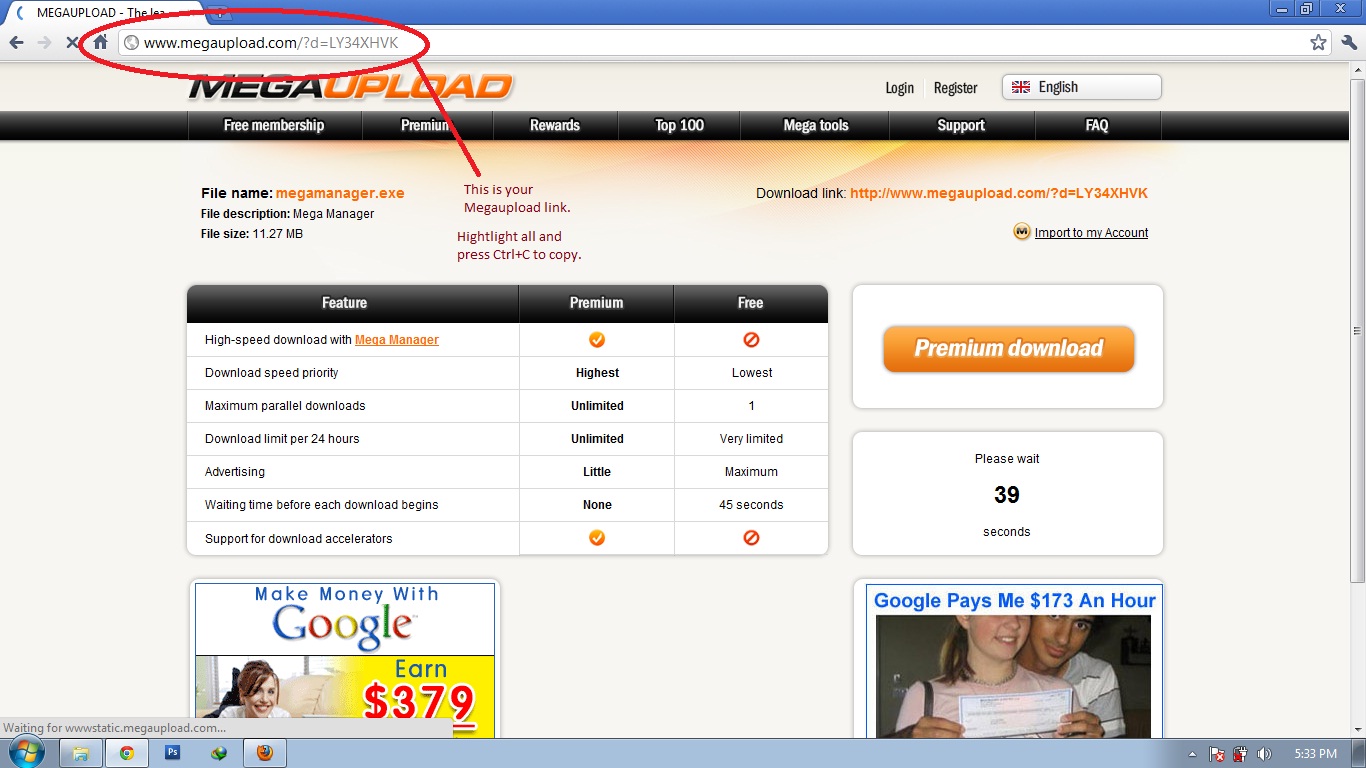
Click To Enlarge
2nd Step > Open the MEGAPID Web Page and Paste the URL of Megaupload link that you already copy

Click To Enlarge
3rd Step > Just Click the generate button. And make sure that there's no space between your URL and the box ( | http://www.megaupload....| ) If not, it will say invalid URL.

Click To Enlarge
4th Step > Fill in the 2 words in the red box. No need to include the comma, dot, exclamation mark.Only write either number or text only.

Click To Enlarge
5th Step > Wait for the countdown average 20second.(Better than 60second and you have great download speed right?) After the countdown finish, you should be able to click on the "Create Download Link" Button.

Click To Enlarge
6th Step > Finally your PREMIUM LINK will be prepared and the file is ready to be downloaded with PREMIUM Account.:) Have FUN.

Click To Enlarge
Saturday, May 21, 2011
How To Combine .001 Extension
How to combine files (.001, .002, etc.)
Hello world, this guide is not made by me, i got it from a blog http://hanazone.wordpress.com/how-to-combine-files-001-002-etc/ So you see I don't have any intention to make this guide as mine. I just want to share to the world. :) Peace...Windows users:
1) Download HJSplit It’s for free!
2) Open the program
3) Click ‘join’

4) Click ‘input file’

5) Select the file you want to get joined (will be a .001-file)

6) Click ‘start’ and wait until the program finishes

Subscribe to:
Posts (Atom)